Evaluating Personalized Sports Decor Baseball CNC Designs for Custom Wall Art
Creating custom wall décor that resonates with sports enthusiasts requires a blend of aesthetic appeal and technical precision. For makers, hobbyists, and small business owners utilizing laser cutting technology, Personalized Sports Decor Baseball CNC files represent a specific category of digital assets designed to bridge the gap between fandom and interior design. Unlike generic clip art or standard vector illustrations, these files are engineered specifically for subtractive manufacturing processes like laser cutting and CNC routing. Understanding the nuances of these digital products is essential for anyone looking to produce high-quality monogram gifts or layered wall art without encountering common fabrication errors.
Defining the Scope of Sports-Themed CNC Files
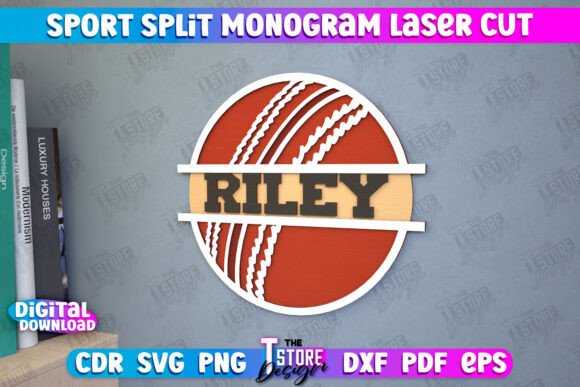
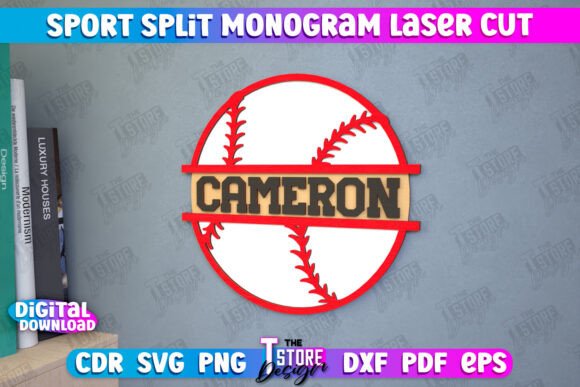
A Personalized Sports Decor Baseball CNC file is not merely an image of a baseball; it is a structured set of vector paths optimized for machine interpretation. The primary distinction lies in how the data instructs the hardware. In a typical design intended for print, color fills and gradients dominate. However, in the realm of laser cutting, the design must be deconstructed into actionable commands: where the beam should cut through the material entirely and where it should only mark the surface.
High-quality files in this niche often utilize a color-coding system to differentiate these operations. For instance, a robust design package will designate specific lines, such as red lines for cutting and black lines for engraving. This pre-configuration saves the operator significant time during the setup phase, reducing the risk of human error when assigning power and speed settings in software like LightBurn or RDWorks. The inclusion of a "sport monogram" element further elevates the utility of these files, allowing for the integration of initials or names within the baseball motif, transforming a standard shape into a bespoke gift idea.
File Format Compatibility and Software Considerations
One of the most critical factors in evaluating a digital download for laser projects is file format versatility. A comprehensive archive for a baseball décor project should ideally include a range of formats such as SVG, EPS, PNG, PDF, and DXF. Each format serves a distinct purpose depending on the user's workflow and software ecosystem.
- SVG (Scalable Vector Graphics): Widely supported by web-based design tools and entry-level laser software. It is excellent for scaling but can sometimes suffer from node interpretation issues in industrial software.
- DXF (Drawing Exchange Format): Often considered the gold standard for CAD-based laser cutting. It maintains precise dimensional integrity, making it crucial for projects where fit and alignment are paramount.
- EPS and PDF: Preferred by users working in Adobe Illustrator or CorelDRAW before exporting to machine-specific formats.
- PNG: Useful for previewing the design or for users who may need to trace the image manually, though it lacks the vector data required for direct cutting.
A notable technical consideration arises when using popular software like LightBurn. While LightBurn is a powerful tool for managing laser jobs, it has been known to occasionally distort dimensions when importing SVG files, particularly if the file contains complex curves or non-standard units. For users experiencing scaling discrepancies, switching to the DXF file format is a proven troubleshooting step. DXF files generally communicate dimensional data more rigidly, ensuring that a 12-inch design remains exactly 12 inches upon import. This compatibility check is a vital part of the decision-making process before purchasing or downloading any CNC asset.
Comparing Pre-Made CNC Files vs. Custom Design
When deciding whether to utilize a pre-made Personalized Sports Decor Baseball CNC file or to design one from scratch, several trade-offs emerge. Creating a sports monogram from zero requires a deep understanding of kerf compensation (the width of the laser beam), structural integrity of thin bridges, and the layering logic required for multi-material projects.
Pre-made files offer immediate efficiency. They are typically tested by the creator to ensure that text elements are legible at various sizes and that intricate details, like stitching on a baseball, do not burn away or become too fragile during cutting. This approach is best suited for individuals who need reliable results quickly or those who lack advanced vector editing skills.
Conversely, custom design offers unlimited creative freedom. If a client requests a highly specific font style or a non-standard arrangement of elements, starting from scratch is necessary. However, this comes with the cost of time and the risk of trial-and-error waste on materials. For most standard applications—such as nursery décor, man cave signage, or team gifts—a professionally prepared file provides a balanced solution that mitigates technical risk while allowing for personalization through variable text fields.
Material Selection and Project Limitations
The suitability of a baseball CNC design also depends heavily on the chosen material. These files are generally optimized for materials like plywood, MDF, acrylic, and cardstock. When working with wood, the engraving lines (often designated in black) create a contrasting char that highlights the monogram and stitching details. With acrylic, the cut lines (red) produce polished edges if using a CO2 laser, while the engraved areas turn opaque white.
However, limitations exist. Highly intricate designs may not translate well to very thick materials where the laser beam angle causes tapering, potentially obscuring fine details. Additionally, if the design involves multiple layers for a 3D effect, the tolerance between layers must be accounted for. A file designed for 3mm plywood may require adjustment if the user intends to use 6mm board. Users must evaluate whether the provided file allows for easy modification of stroke widths or if it is a static path. The ability to request alternative file types or sizes from the creator is a valuable safety net, ensuring that the digital asset can be adapted to specific inventory constraints.
Decision Factors for Buyers and Makers
Selecting the right digital resource involves assessing three core pillars: compatibility, clarity, and support.
- Software Compatibility: Does the package include the native format for your specific machine controller? If you rely on LightBurn, prioritize packages that explicitly recommend or include DXF files to avoid dimension distortion.
- Instructional Clarity: A professional product will clearly define which colors correspond to cutting versus engraving. Ambiguity here leads to wasted material. Look for documentation that specifies "Red = Cut" and "Black = Engrave" protocols.
- Creator Support: Technical issues can arise mid-project. Access to a creator who is willing to provide alternative formats (such as different PNG resolutions or specific vector tweaks) adds significant value to the transaction.
Ultimately, a Personalized Sports Decor Baseball CNC file is a tool that simplifies the production of themed décor. It is the ideal choice for makers who want to focus on assembly and finishing rather than vector path optimization. However, for projects requiring non-standard dimensions or unique structural modifications, users should be prepared to edit the vector nodes or communicate with the file provider to ensure the final output meets their exact specifications. By understanding the interplay between file formats, software behavior, and material properties, creators can consistently produce high-quality, personalized sports gifts that stand up to scrutiny.