Unlocking Precision: A Practical Guide to Laser Cut Decorative Panels Bundle 41
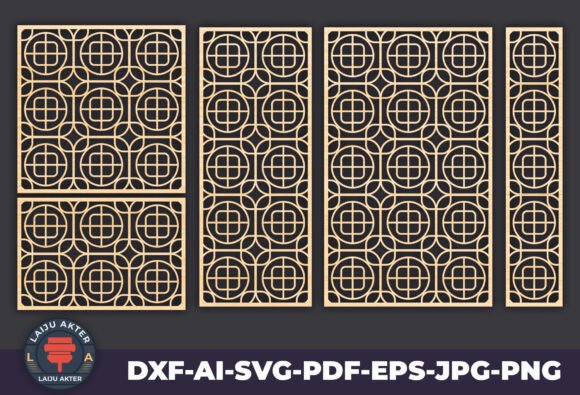
Transforming a raw material into a stunning piece of art requires more than just a high-end machine; it demands the right blueprint. This is where Laser Cut Decorative Panels Bundle 41 steps in as a vital resource for creators looking to elevate their projects. Whether you are a hobbyist designing a custom room divider or a professional fabricator producing intricate metal gates, the quality of your vector files dictates the final outcome. This collection features an array of intricate and modern panel designs, perfect for home decor, wall art, partitions, furniture inlays, and screens. However, simply downloading a file is not a guarantee of success. Many users stumble not because of their equipment, but due to overlooked details in file preparation and material selection.
The appeal of this bundle lies in its versatility. It includes high-quality vector files in AI, DXF, PDF, SVG, EPS, PNG, and JPG formats, ensuring compatibility with Glowforge, Cricut, Silhouette, CNC routers, and other laser cutting machines. Yet, a common misunderstanding among beginners is assuming that "compatible" means "ready-to-run" without inspection. Before you send a design to your laser cutter, you must understand the specific requirements of your machine and material. Ignoring these nuances can lead to wasted materials, broken tabs, or cuts that do not align properly.
Avoiding the Trap of Ignoring Material Thickness
One of the most frequent errors when using decorative panel designs is failing to account for material thickness during the planning phase. Designs in Laser Cut Decorative Panels Bundle 41 are crafted for precision, but they are often created as two-dimensional vectors. If you are creating a 3D assembly, such as a freestanding screen or a box with interlocking joints, the kerf (the width of the cut made by the laser) and the material thickness are critical.
For instance, if you are cutting 6mm acrylic but your design assumes 3mm plywood, the joints will be loose and the structure unstable. Conversely, forcing thick material into a slot designed for something thinner can crack the piece or damage your machine bed. To avoid this, always measure your actual material stock before starting. Use your design software to offset paths slightly if necessary to accommodate the kerf. A good rule of thumb is to run a small test cut on a scrap piece of the same material to verify fitment before committing to the full panel.
The Danger of Overlooking File Formats and Scaling
While this bundle offers multiple file formats, choosing the wrong one for your workflow can cause significant headaches. A common mistake is opening a raster image (like a JPG or PNG) in a vector editing program and expecting clean cut lines. Raster images are made of pixels; when scaled up for large wall art or gates, they become pixelated and unusable for precise cutting. Always prioritize the vector formats provided: AI, DXF, SVG, EPS, or PDF.
Furthermore, scaling issues are rampant. Users often import a DXF file into their software, and the dimensions appear incorrect because the original file was saved in inches while the workspace is set to millimeters, or vice versa. This can result in a panel that is ten times larger or smaller than intended. Before cutting, explicitly check the document units and scale the design to your desired physical dimensions. Verify that the design fits within your machine's bed size. If a pattern is too large, consider splitting the design into manageable sections that can be joined seamlessly later.
Material Selection: Beyond Aesthetics
The beauty of these designs is that they are suitable for wood, acrylic, metal, and other materials. However, not all materials behave the same way under a laser or CNC router. A design that looks magnificent in delicate birch plywood might lack structural integrity if cut from thin aluminum without proper reinforcement. Similarly, certain plastics release toxic fumes when lasered and should never be used.
When selecting materials for Laser Cut Decorative Panels Bundle 41, consider the end-use environment. Is the partition for an indoor living room or an outdoor gate? For exteriors, you need weather-resistant materials like treated hardwoods, marine-grade plywood, or powder-coated metals. Using untreated MDF outdoors will lead to swelling and rot within months. For interior decor, acrylic offers a sleek, modern look, but it scratches easily. Wood provides warmth but may warp if the grain orientation isn't considered during cutting. Always match the material properties to the function of the object you are building.
Optimizing for Efficiency and Waste Reduction
Efficiency is key for professionals and small business owners. A frequent oversight is neglecting nesting—the process of arranging parts on the material sheet to minimize waste. Intricate patterns in this bundle can generate a lot of offcuts if not arranged carefully. Before cutting, use nesting software or manually arrange your vectors to maximize material usage.
Additionally, pay attention to the order of operations. For designs that require both cutting and engraving, always engrave first and cut last. If you cut the piece out first, it may shift slightly on the bed, causing the engraving to misalign. This is particularly important for detailed artistic projects where registration is visible. Securing your material properly with clamps or a honeycomb bed also prevents movement during the cutting process, ensuring the intricate details remain sharp.
Checklist Before You Cut
To ensure the best results with your new files, run through this quick mental checklist:
- Verify Units: Confirm your software is set to the correct measurement system (mm or inches).
- Check Lines: Ensure all cut lines are closed paths with no gaps.
- Test Fit: Perform a dry run or cut a small section on scrap material.
- Secure Material: Make sure the sheet is flat and firmly held down.
- Review Settings: Adjust power and speed settings specifically for your material type and thickness.
By approaching Laser Cut Decorative Panels Bundle 41 with a mindset focused on preparation and material science, you transform a simple download into a professional-grade product. These designs are powerful tools capable of adding a unique touch to any setting, from residential interiors to commercial facades. Download instantly and start crafting, but remember that the difference between a good project and a great one often lies in the details you address before the laser ever turns on. With careful planning and the right techniques, these stunning panels will serve as the foundation for your next masterpiece.